The pain diary that ends the guesswork at your doctor's visit.
Symkura is an app for iPhone and Android. You log where it hurts and how much in seconds. Symkura shows which triggers you log most and how your numbers change, and turns it all into a patient report before your visit.
For recurring and chronic pain, whatever the cause. Ready for migraine, tension headache, fibromyalgia, chronic back pain, arthritis, neuralgia and endometriosis; anything else you add yourself.
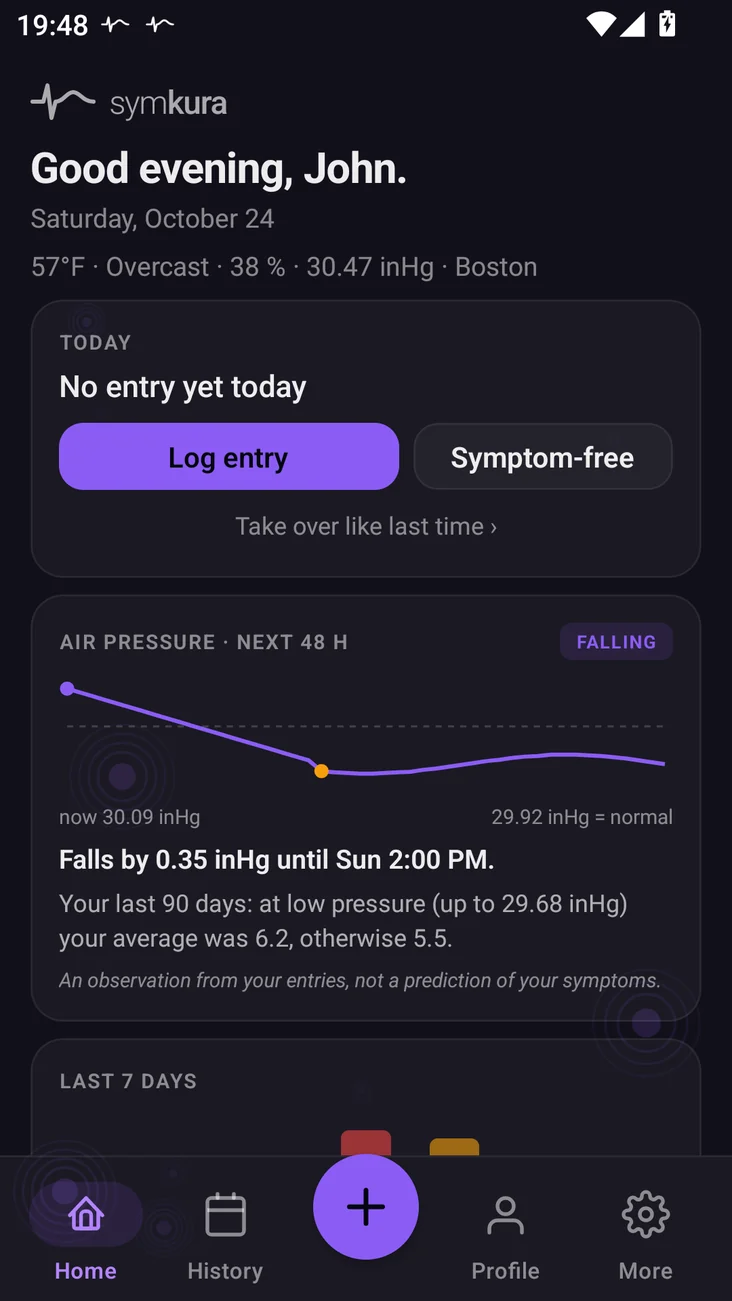
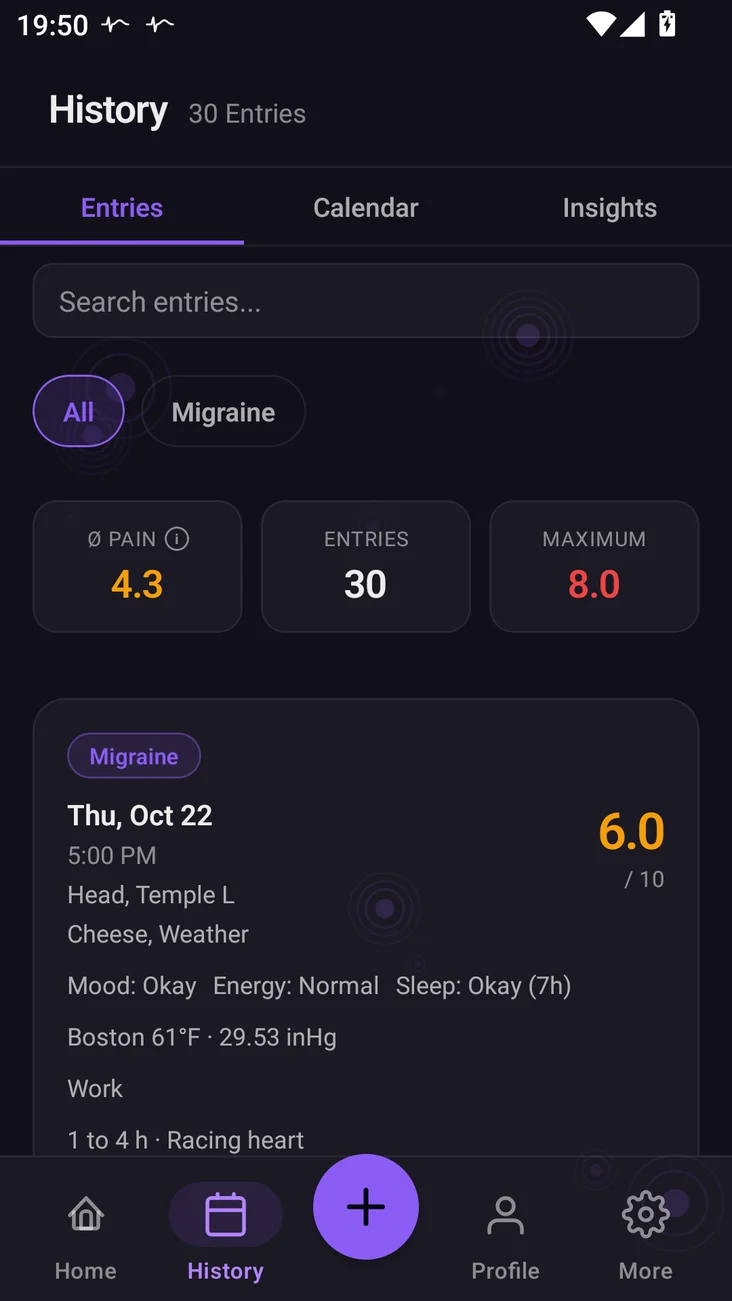
One entry holds everything that matters later.
On symptom-free days, one tap on “Symptom-free” is enough. On similar days, reuse your last entry as a template. The reminder only comes when nothing is logged today, and you answer it right in the notification.
Otherwise you only fill in what matters today. Everything else is optional; the form shows what an entry can hold.
- Intensity
- 0 to 10 on a slider
- Location
- Body map front and back with 39 regions, plus the left or right temple for migraine and tension headache; each spot mild, moderate or severe
- Duration
- How long it lasts. If it is still going, the attack stays open: you add updates, end it, and Symkura measures the real duration for the report.
- Accompanying symptoms
- Sensitivity to light, nausea, aura and your own
- Well-being
- Mood, energy, sleep
- Triggers
- Suggested and your own, plus food and drink
- Restriction
- What your symptoms kept you from, such as work, exercise, housework or sleep
- Medication
- Acute or preventive, with dose. Two hours after an acute dose, a notification asks whether it helped. A preventive gets a start date and, if you like, a daily reminder.
- Photo and note
- Notes always, photos with Pro
- Weather
- Filled in automatically once you set a city, no GPS, in °F and inHg or °C and hPa. If air pressure rises or drops noticeably in the next 48 hours, Home shows it next to your own average on low-pressure days. An observation from your entries, not a forecast of your symptoms.
- Cycle and weight
- If you want. Symkura compares your pain during your period with the rest of your cycle.
The report for your next visit.
You pick 30, 60 or 90 days and the conditions. Symkura turns them into a free PDF to print or send ahead.
The appointment at a glance
If you like, Symkura picks up your doctor's appointments from your phone's calendar, read-only. Home shows how many days are left, and Symkura reminds you on the day or up to three days before.
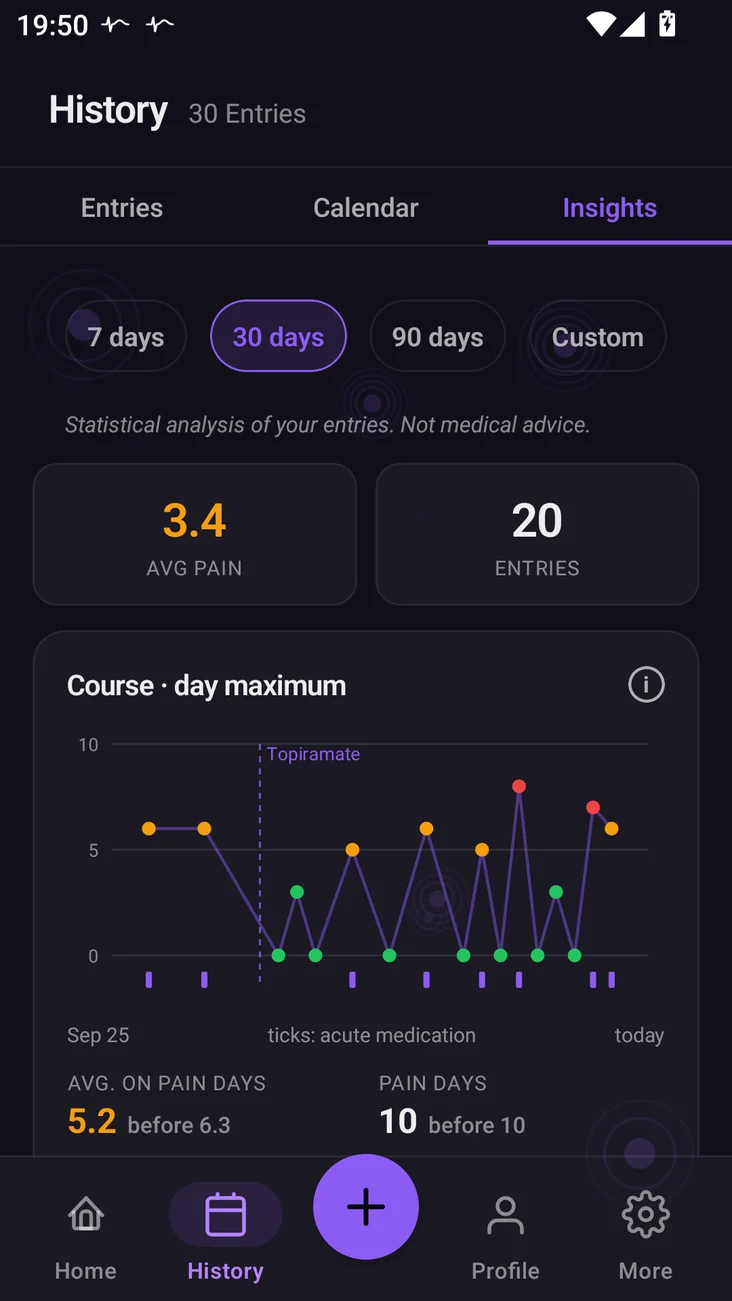
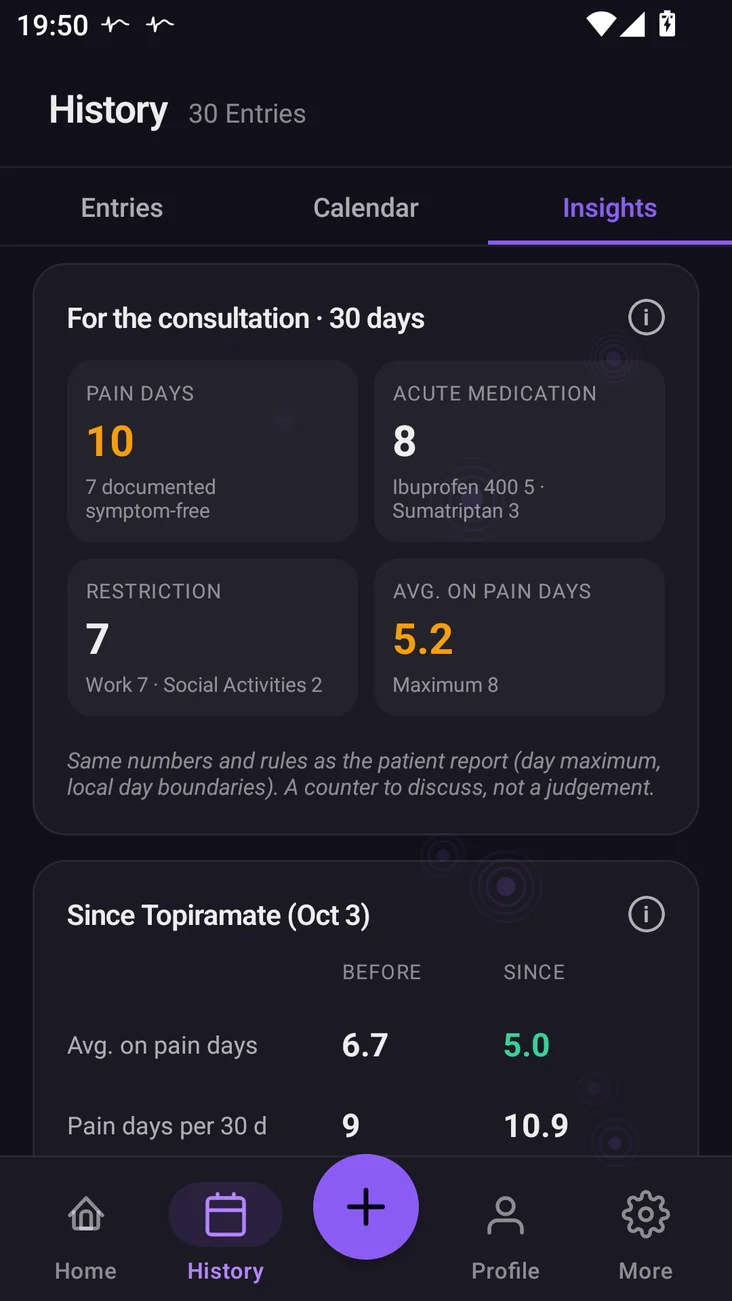
Screenshots from the app, with different sample data than the report.
First, in the app: your insights
Insights show your average, pain days and days with acute medication, which triggers you log most and how you rated your medications. 7 and 30 days are free, 90 days and custom ranges come with Pro.
The report follows the same rules: pain days are days with a value above 0, and the daily maximum counts. Statistics on your own entries, not medical advice.
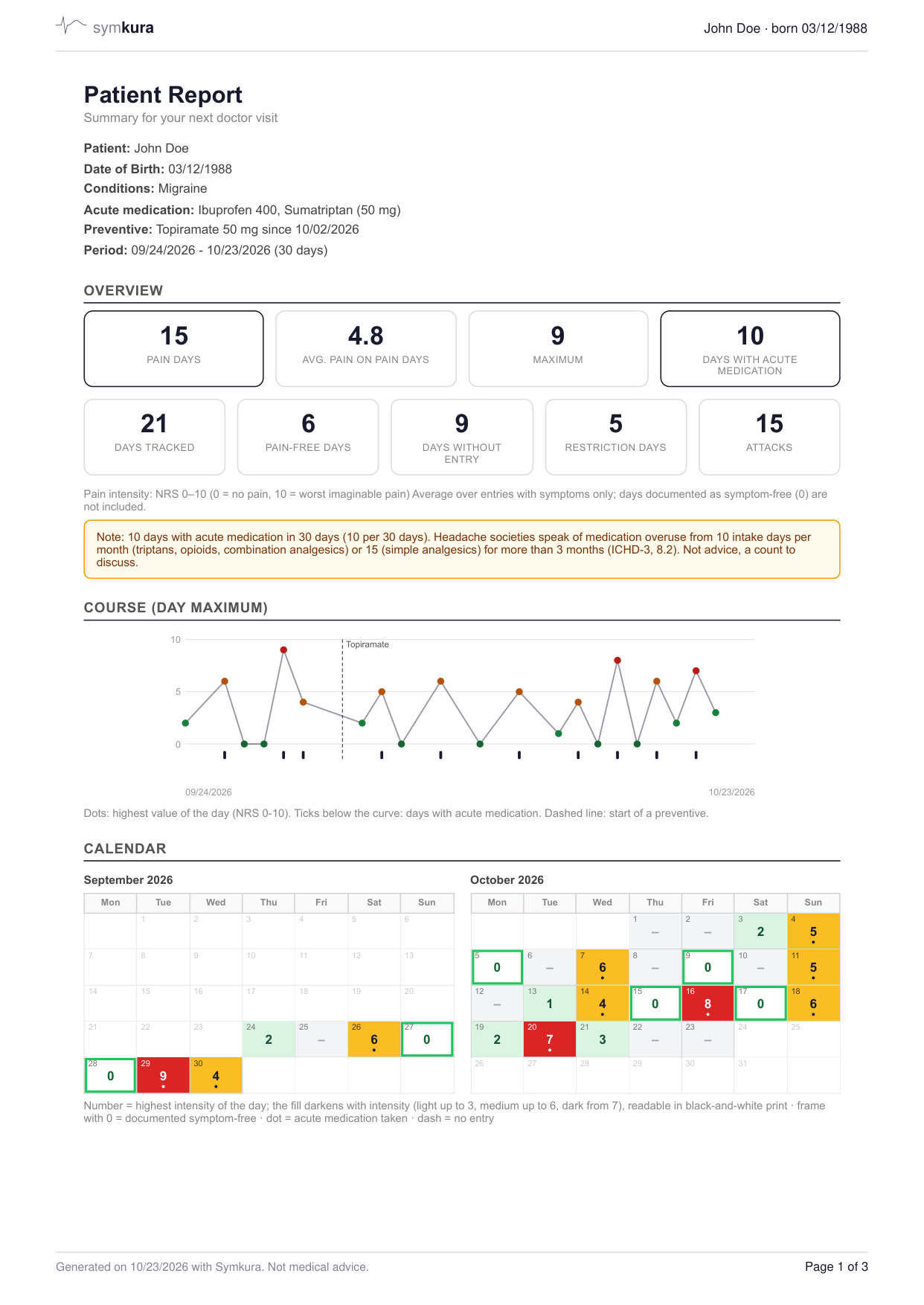
- Header: patient, medication, periodName and date of birth, conditions, acute medications, preventive with start date, and the period
- OverviewPain days, average, maximum, acute medication, restrictions, attacks. With acute medication on 10 or more of 30 days, the report adds a note to discuss it.
- Course (day maximum)Daily highest pain on the 0 to 10 scale, ticks for acute medication, the start of a preventive as a dashed line
- CalendarFilled by intensity, symptom-free with an outline and 0, no entry with a dash, readable in black and white
On the following pages
Month comparison, before and since a preventive, triggers and patterns, the daily log entry by entry with the measured duration of each attack, times of day, wellbeing and sleep, medications with your ratings and room for the practice's notes. Weight and cycle are added if you track them, and a CSV export takes all entries along for your own records.
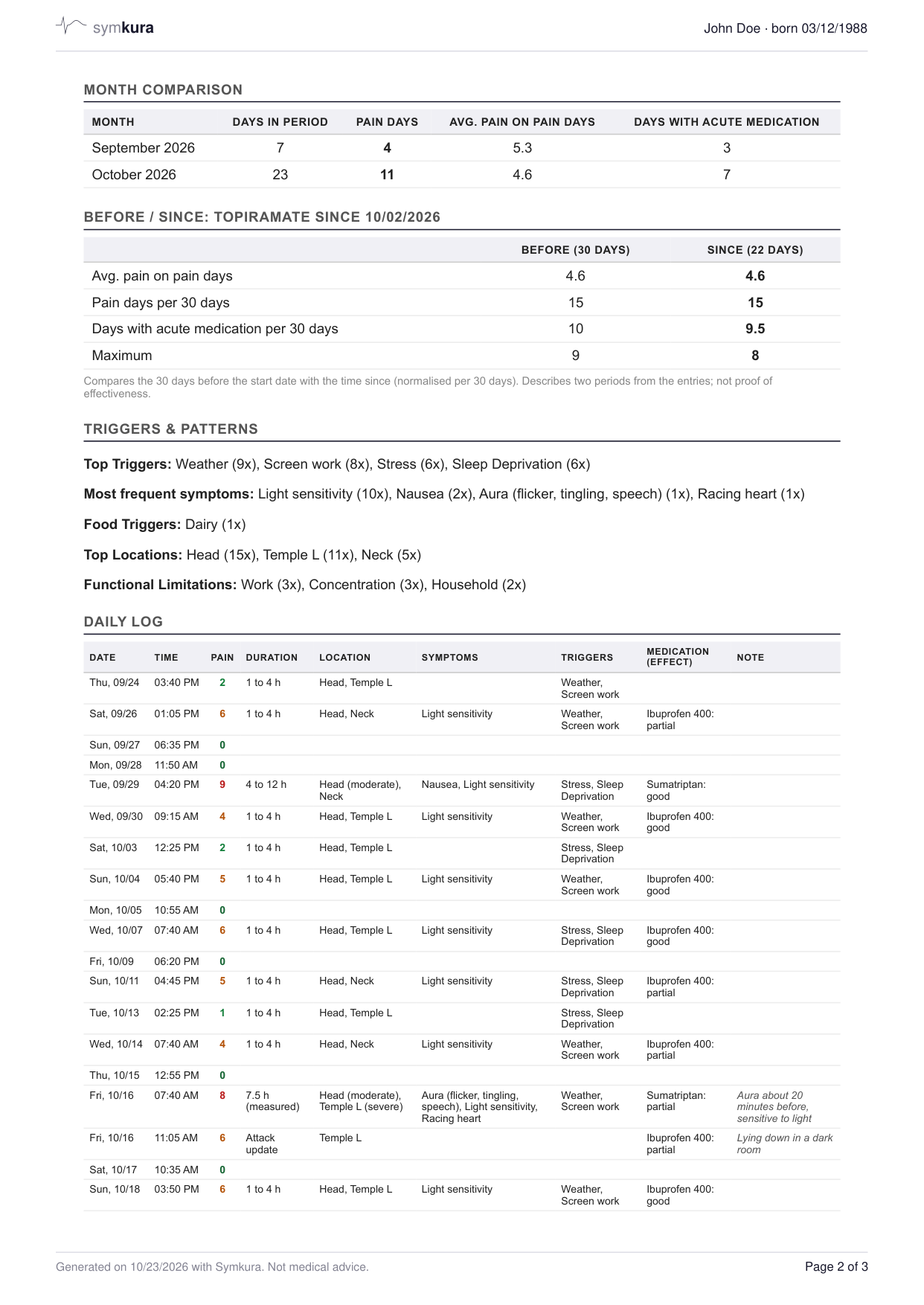
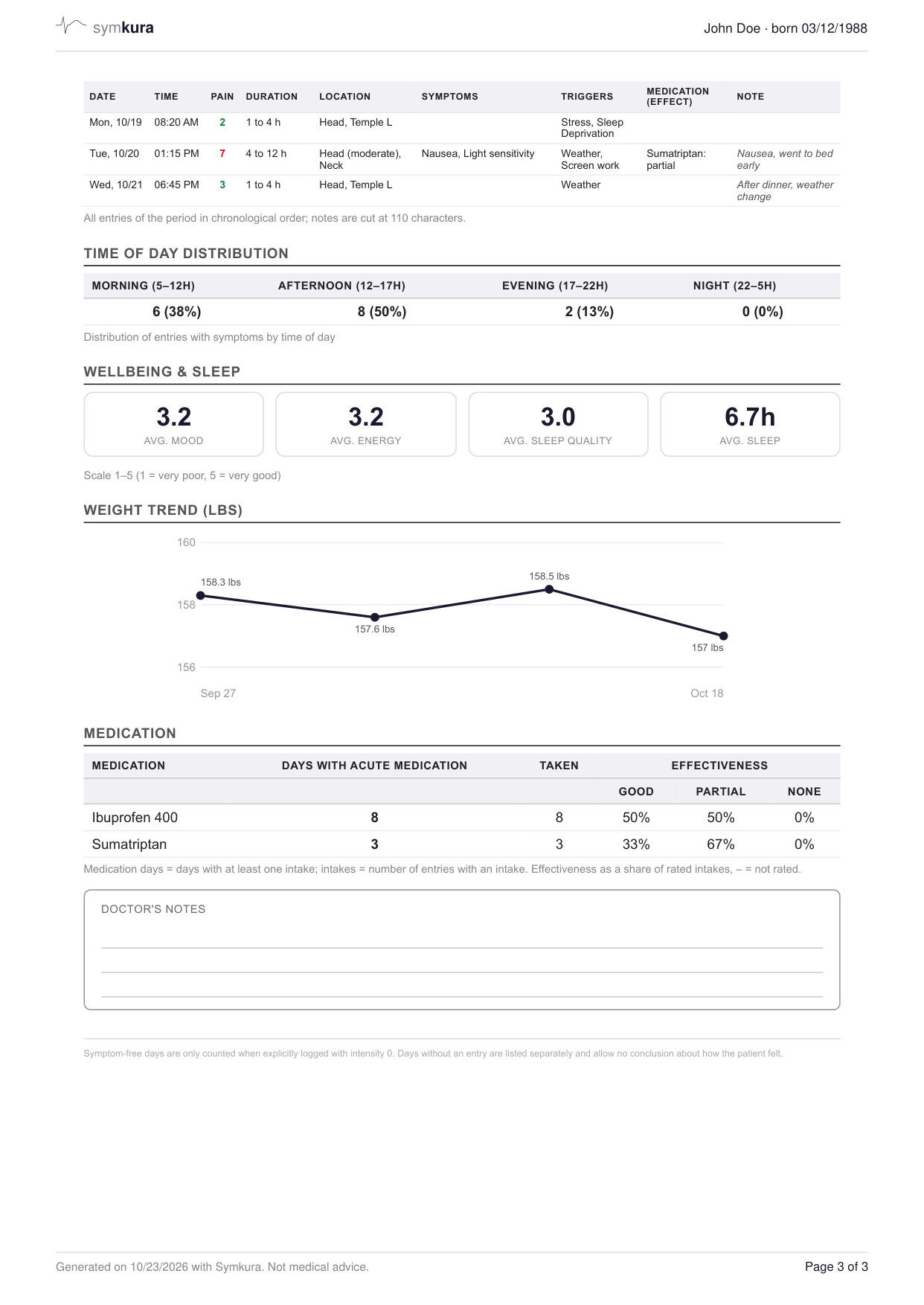
Symkura is a documentation tool, not a medical device. It does not replace medical advice, diagnosis or treatment.
From entry to report
Where your data lives.
Symkura needs a free account. It backs up your entries and brings them back on a new phone.
- Storage
- On your phone and, through your account, on our own server in Germany (IONOS SE). We use no US cloud for health data.
- Transfer
- Encrypted (TLS)
- Access
- Only you can see your entries: for every request, the server only returns data from your account (row-level security).
- Ads and selling
- No ads, no sale, no profiling. We never share your health data with third parties.
- Service providers
- Apple and Google (purchase), RevenueCat (purchase status, pseudonymous ID), Expo (app updates: IP address, operating system, app version, random installation ID), Brevo (email address for password and confirmation emails), Open-Meteo (location for the weather), Cloudflare (feedback form). None of them receives your entries.
- Lock
- PIN or biometrics, with the PIN in your phone's protected storage. The app switcher doesn't show your data, Android blocks screenshots of the app, and Google device backups leave the app data out.
- Usage statistics
- Only with your consent: technical events such as “entry created”, linked to your account, so pseudonymous, never symptoms, values, notes or photos. We keep them for 12 months, and you can switch them off in settings anytime.
- Community data
- Only with your consent: combined values per condition, at most once a day, under a random device token not linked to your account. Insights show what others with the same condition report once there are 10 contributions.
- Delete and export
- Delete your account and all data linked to it on the server, photos included, anytime in the app, and take everything with you as CSV and PDF first. Without the app, use the page Delete account. Uninstalling the app only removes the data on your phone.
Start free.
Free
$0
- Unlimited entries, every field except photos
- History and calendar with no time limit, insights for 7 and 30 days
- Patient report as a PDF for 30, 60 or 90 days, with the before and since comparison, plus CSV export
- Weather with a 48-hour air pressure outlook
- Cycle and weight if you want them, with a cycle comparison in Insights
- Reminders you answer right from the notification
- Four dark color themes for light-sensitive days, plus a light one
- Up to 2 conditions
- App lock and sync through your account
Pro
$4.99 a month or $29.99 a year
- Insights for 90 days and custom ranges
- Before and since comparison for a preventive in insights
- All entries of a day in the calendar
- Photos in entries
- Unlimited conditions
- Custom accent color with a color wheel
US prices; your store shows the price for your country. Billed through the App Store or Google Play. It renews automatically unless you cancel at least 24 hours before the end of the current period.
Questions
Is Symkura a medical device?
No. Symkura is a documentation tool, not a medical device. It makes no diagnoses and gives no medical advice; its analyses are statistics about your own entries.
Which conditions is Symkura made for?
Symkura comes with migraine, tension headache, fibromyalgia, chronic back pain, arthritis, neuralgia and endometriosis. You can add conditions of your own. The free version tracks up to two conditions, Pro as many as you like.
Where is my data stored?
On your phone and, through your account, on our own server in Germany (IONOS SE). Transfers are encrypted (TLS). Only you can see your entries: for every request, the server only returns data from your account (row-level security).
Why do I need an account?
So your entries are backed up and come back on a new phone. The account is free, and we never use it for advertising.
Which service providers are involved?
For purchases, app updates, emails, feedback and weather we work with a few service providers: Apple and Google, RevenueCat, Expo, Brevo, Cloudflare and Open-Meteo. None of them receives your entries. The privacy policy lists exactly what is transferred.
Do I share anything with others?
Only if you agree. Community data are combined values per condition, such as the average, most common triggers and body regions, at most once a day and under a random device token not linked to your account. Usage statistics count technical events such as “entry created”; they are linked to your account, so pseudonymous, and never include symptoms, values, notes or photos. Both stay off until you turn them on.
How do I delete my account?
In the app, open your account under “More” and choose “Delete account and data”. This removes all data linked to your account on our server, photos included. Before that, you can take everything with you as CSV and PDF. Without the app, use the page Delete account. Uninstalling the app only removes the data on your phone.
How much is Pro?
The prices are listed above under “Pricing”; your store shows the price for your country. Billing runs through the App Store or Google Play. The subscription renews automatically unless you cancel at least 24 hours before the end of the current period, and you can cancel it anytime in your store settings. Deleting your account does not cancel a running subscription.
Which devices does it run on?
An iPhone with iOS 15.1 or later, or an Android phone with Android 8.0 or later. There is no dedicated iPad layout. Symkura is meant for people aged 16 and over.
Which languages does Symkura support?
English and German.
Coming soon for iPhone and Android.